
Every way of hiding files makes a trade between three things: whether it has its own password, whether it looks like nothing, and whether your files survive a lost phone or a new one. The iPhone Hidden album and Google Photos Locked Folder are free and built in, but open with your phone's passcode. Samsung Secure Folder and Android Private Space add a separate lock but stay on one phone. Encrypted containers such as VeraCrypt are strong and portable, and obviously encrypted. Steganography tools look like nothing and hold very little. HideFile puts files of any type inside an ordinary photo, PDF or video with its own password, and it is closed source and visible to a forensic tool.
No option wins every row. The useful question is who might look, and what happens to your files when something changes.
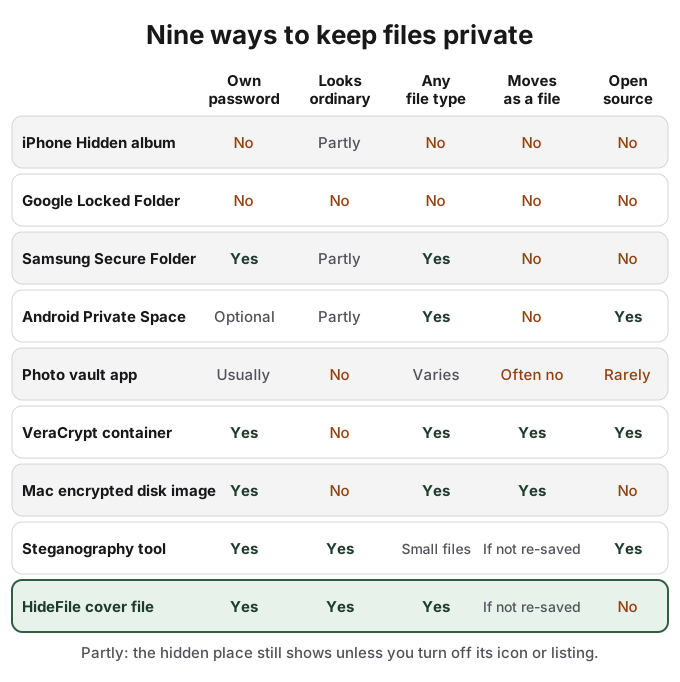
Built-in hidden albums open with your phone's passcode
The iPhone Hidden album and Google Photos Locked Folder are the right answer for most people most of the time. They cost nothing, take two taps, and keep photos out of the main library, search and widgets.
Their limit is the lock. Apple's Hidden album unlocks with Face ID, Touch ID or the device passcode, and the passcode is always the fallback. Google is explicit about Locked Folder: its password "is the same as your device screen lock," and "people who have access to the device screen lock can unlock Locked Folder." Anyone who knows your passcode gets in.
They also hold only photos and videos, and they handle a phone change differently. With iCloud Photos on, the Hidden album syncs to every device signed in to your Apple Account, including iCloud.com. Locked Folder is local unless you turn on its backup, which Google's help page first documented in August 2023; without it, Google says items are lost if you uninstall Photos, clear its data, or the phone is damaged or lost. Our guides to the iPhone Hidden album and Google Photos Locked Folder cover both in detail.
Secure Folder and Private Space add a lock but stay on one phone
Samsung Secure Folder and Android 15's Private Space are separate, encrypted areas of the phone that can hold apps and files as well as photos, with a lock that can differ from the screen lock. Both can hide their own entry point: Secure Folder through "Show icon on Apps screen", Private Space through "Hide private space when it's locked".
Neither travels well. Samsung's US support page now says "Data backup is no longer available for Secure Folder" and points to Smart Switch for moving to a new phone. Google says Private Space data is not included in device backups and is not restored with them, and that forgetting its unlock factor means losing access. Google also lists where Private Space can still be uncovered: computer access including adb, device logs, and other apps. Private Space is part of the Android Open Source Project; Secure Folder is Samsung's own. See Samsung Secure Folder and Android Private Space.
Vault apps keep your files hostage to the app
A photo vault app adds its own PIN, which solves the passcode problem, and usually creates a new one: your files live in the app's private storage. If the app breaks after an update, stops being maintained, does not move to a new phone or starts charging to get back in, the files go with it. Those are the failures that fill vault app reviews. The icon on your home screen also tells anyone looking that something is being kept private, which is why some disguise themselves as calculators.
Quality varies widely and is hard to check. In a 2015 teardown of one iOS vault app, the security firm IOActive found the PIN "stored in plaintext" and the photos not encrypted at all. That was one app, a decade ago, but it shows why a vault's lock screen is no evidence of encryption. Is a photo vault safe goes further.
Encrypted containers are strong, portable and obviously encrypted
VeraCrypt and the encrypted disk images built into macOS hold any kind of file behind a strong password, and the container is a single file you can copy, back up and move. VeraCrypt is free, open source, runs on Windows, macOS and Linux, and was independently audited by Quarkslab, with results published in October 2016. It also offers hidden volumes, a second volume inside the free space of the first, designed so that it "should be impossible to prove" the hidden one exists.
The trade-off is that a container announces itself. A large file of random-looking data, or a disk image that asks for a password, tells anyone looking that something is encrypted. Both are desktop tools; neither is practical on a phone. For a Mac, how to hide files on Mac walks through making an encrypted disk image.
Steganography tools hide a little, very well
Classic steganography tools such as steghide and OpenStego hide data in the pixels or samples of an image or sound file. Done well, the result is very hard to tell from an ordinary picture, and they are open source. The cost is capacity: a pixel-level payload is small, suited to a message or a key rather than a folder of photos. Re-encoding the image generally wipes it.
Maintenance and detection matter too. steghide's last release was version 0.5.1 in 2003, and the open-source tool stegseek can detect steghide data without the password and run a list of millions of common passwords against it in seconds. How steganography works covers the method and its detection.
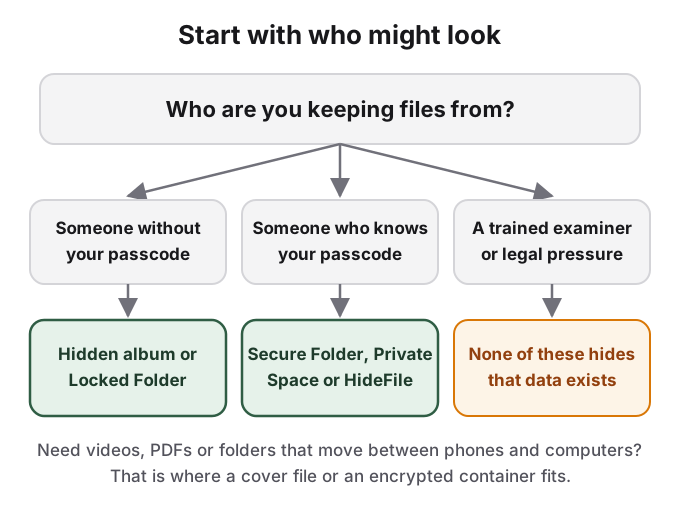
When each option wins
| Option | It wins when | It loses when |
|---|---|---|
| iPhone Hidden album, Google Locked Folder | Nobody else knows your passcode and you only need to tidy photos away | Someone knows your passcode, or you need documents |
| Samsung Secure Folder, Android Private Space | Someone knows your passcode and the files never need to leave that phone | You change phones, reset, or lose the device |
| Photo vault app | You want a separate PIN on one phone and trust the developer | The app breaks, disappears, or charges to let you back in |
| VeraCrypt, Mac encrypted disk image | You want audited or built-in encryption for any file on a computer | You need it on a phone, or you do not want it to look encrypted |
| Steganography tool | You need to hide a short message or key where nobody expects it | You have more than a little data, or the image gets re-saved |
| HideFile cover file | Someone knows your passcode, the files are of mixed types, and they must move between phones and computers as one ordinary-looking file | You need open, audited code, or protection from a forensic examiner |
Where HideFile fits
HideFile takes the parts of these options that people ask for most and accepts their costs openly. Like a container, it holds any kind of file and folder, has its own password, and is a single file that copies, backs up and moves to a new phone. Like a steganography tool, it looks like what it is: an ordinary photo, PDF or video that opens normally in any viewer. It runs in any modern browser, on iPhone, Android and computers, with nothing to install and no account.

The costs are just as real. HideFile stops casual snooping, not forensic tools: a purpose-built tool can tell that data was added to the cover, though it cannot read the contents without the password. The cover grows by roughly the size of what is inside. Apps that re-save or compress pictures can strip the hidden part. There is no password recovery. And unlike VeraCrypt, our code is not open source and has not been independently audited. The security page sets all of this out, and the walkthrough shows the whole loop with real screenshots.
Sources
- Apple Support: Hide photos with the Hidden album
- Google Photos Help: Hide photos and videos with Locked Folder, checked October 14, 2026; Wayback snapshots of August 29, 2023 and August 30, 2023
- Samsung US: Secure Folder troubleshooting and backup, checked October 14, 2026
- Android Help: Private space, checked October 14, 2026
- Android Open Source Project: Private space
- IOActive: Breaking into and Reverse Engineering iOS Photo Vaults, November 19, 2015
- VeraCrypt: Hidden Volume
- OSTIF: The VeraCrypt Audit Results, October 17, 2016
- Apple Support: Create a disk image using Disk Utility on Mac
- steghide: project home page
- stegseek: GitHub repository
- OpenStego: GitHub repository