
A photo vault app is as safe as three things you usually cannot see from the App Store page: where it stores your photos, whether it really encrypts them, and whether it will still work next year. Most vault apps stop a friend scrolling your camera roll. The documented failures are rarely hackers. They are phone switches that leave the photos behind, paywalls between you and your own files, and apps that stop working after an iOS update.
There is also a cost that no encryption setting fixes. A vault app is a lock icon on your Home Screen, and a lock tells anyone who sees it that there is something inside.
Vault apps keep files on the phone or on the vendor's servers
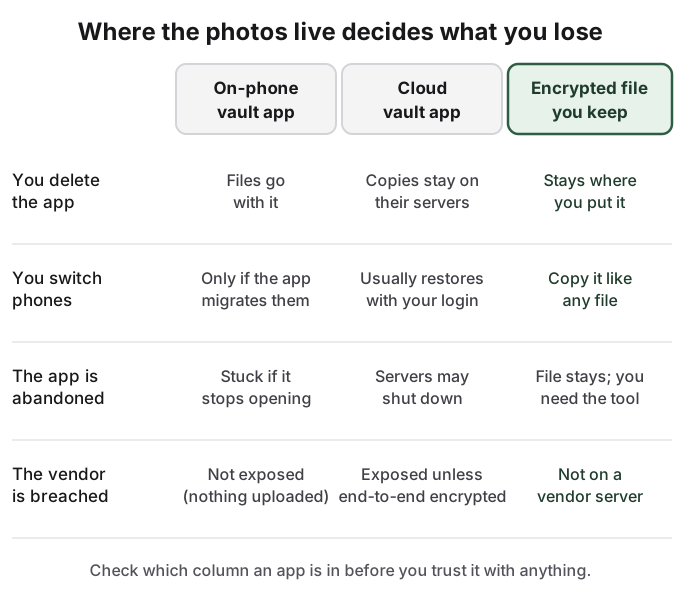
Every vault app makes one of two storage choices, and most of what can go wrong follows from it.
An on-phone vault copies your photos into the app's private storage. Nothing is uploaded, which is what many people want: a Reddit user in r/privacy asking for a vault alternative wrote, "Don't need cloud back ups just a way to separate photos locally." The catch is that the photos now belong to the app's storage. Delete the app and they go with it. Switch phones and they move only if the app has its own transfer feature and you used it.
A cloud vault uploads your photos to the developer's servers, so a new phone and a login bring them back. The developer now holds a copy, and unless the app encrypts end to end, with a key only you have, a breach of those servers or a change of owner exposes it. If the company closes, the servers can go with it.
You usually cannot check which kind you have. In r/ios, a user weighing a little-reviewed vault app asked how to know "whether my private files might be uploaded to the internet without my knowledge". The replies pointed to Apple's built-in Hidden album, or to the developer's own word.
The real failure stories are about losing your own photos
The clearest record of what goes wrong is the 1-star reviews of popular vault apps on the App Store. The same four complaints repeat. On switching phones: "when I switched phones the app did not save any of my info that was hidden in there." On paywalls: the app "forces you to pay to access your content, otherwise you cannot access it and it's gone." On abandonment: "No longer works with iOS 18" and "Importing images no longer works... Seems this app is dead." On recovery: "Don't lose your password... developer does not respond to emails." Some free vaults also show ads, one reviewer reporting "porn like advertisements" inside an app built to hold private photos.
The pattern shows up on YouTube too. Among the most-watched results for "are photo vault apps safe" is a video titled "Keepsafe Vault not working problem solution", with more than 47,000 views. The biggest vault video is a vendor's own promo, and the next is a listicle.
Security research is thinner and older, but it makes one point well. In November 2015, IOActive tested three popular free iOS vault apps on a jailbroken iPhone. The researcher found the passcode "stored in plaintext", found that "the stored photos were not encrypted", and wrote that "Bypassing this lock screen was trivial." On average it took "less than 30 minutes to gain access to the photos and user credentials for each application." The post is explicit that it "does not speak to ALL photo vault applications", and those apps have changed since. The lasting lesson is that a passcode screen and encryption are different things, and from the outside they look identical.
The visible lock is the tell
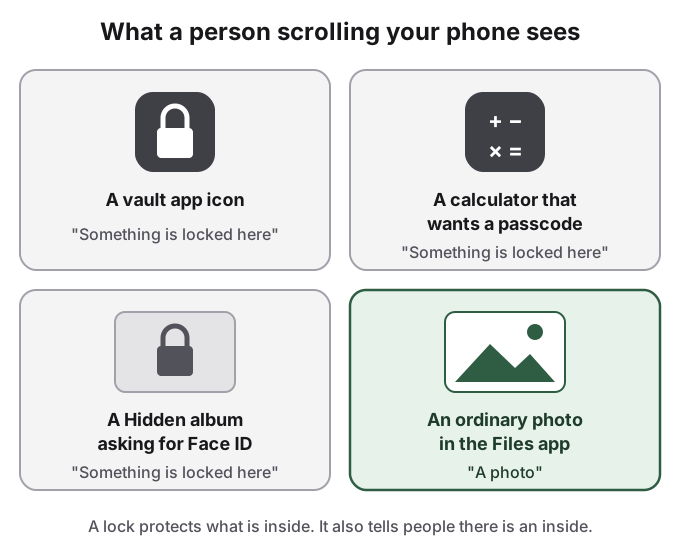
Search for "photo vault app" in Bing Images and you get a wall of padlocks, Face ID prompts and "secret photo vault" banners. That is the vault app's marketing, and it is also exactly what a person scrolling your Home Screen sees.
In relationship threads on Reddit, the discovery is almost never forensic. In one r/relationship_advice post with 238 points, the poster found a password-locked Google Photos space on a partner's phone and never opened it: the lock, and the refusal to open it, were enough. She wrote that "his reaction got me concerned." A Reddit user in r/GooglePixel made the same point about Android's Private Space: "I will not have a locked case in my pocket with the sign 'here are my private stuff'." Calculator disguises are the industry's answer, and they are now so common that a calculator asking for a passcode is its own tell.
Decoy PINs cover one moment, not the app
Many vault apps offer a second PIN that opens a fake album. A Reddit user in r/ios recommended one for that reason: "It even allows you to set a second pin that unlocks a fake album." Another wanted a "fake login / decoy vault, so even if someone unlocks my phone, there's nothing suspicious."
A decoy helps in one situation: someone who does not know the app demands that you open it, and you show them the dull album. It does nothing about the icon, which stays on the Home Screen, or about Screen Time and battery lists that show how much you use it. Anyone who knows vault apps knows decoys exist. And in IOActive's 2015 test, the decoy photos were stored unencrypted like everything else.
How to judge a photo vault app
If you still want a vault app, judge it on what happens when things go wrong, not on the lock screen:
- It says in plain words where your files are stored: on the phone, on its servers, or in your own iCloud.
- It names its encryption and says whether it is end to end. "Military-grade" with no details is a warning sign.
- It exports your photos back as ordinary files, at any time, without a payment.
- It explains how to move to a new phone, and you have tried it with a few test photos before trusting it with real ones.
- Getting to files you already stored never depends on an active subscription.
- It shows no ads. An ad network inside an app full of private photos is a bad pairing.
- It was updated recently, and the developer answers support email.
- It has its own PIN, separate from your phone passcode, because Face ID falls back to that passcode.
The built-in options are often the better start: the Hidden album and locked notes on iPhone, and Locked Folder or Samsung Secure Folder on Android, covered in how to hide photos on Android. They are free, maintained by the platform and cannot hold your photos to ransom. Their weak point is that most of them open with your phone passcode.
How HideFile can help
HideFile avoids the vault app's two structural problems: files locked inside one app's storage, and an icon that announces them. It puts private photos and files inside an ordinary photo, video or PDF, called a cover file, encrypted in your browser with a password separate from your phone passcode. The files are not uploaded to a HideFile server. The cover is a normal file you can copy, back up and move to a new phone, and in Photos or Files it looks like the picture it is. HideFile runs in any browser at hidefile.app; there is no app to install.
It has limits of its own. It stops casual snooping, not forensic tools: a purpose-built tool can tell that data was added to a cover, though it cannot read the contents without the password. There is no password recovery. Messaging apps that re-save images can strip the hidden part, so send covers as files. You still need hidefile.app to open the private part. For a border search, a trained examiner or legal pressure, it is the wrong tool, and so is any vault app.
Sources
- IOActive: Breaking into and Reverse Engineering iOS Photo Vaults (November 19, 2015)
- App Store reviews, sorted by most recent, for two popular photo vault apps: id417571834 and id448033053 (read October 8, 2026)
- Reddit, r/privacy: There a privacy respecting KeepSafe photo vault alternative
- Reddit, r/ios: Is this app safe? Any experience with iLockBox
- Reddit, r/ios: Best hidden app to hide photos/videos?
- Reddit, r/relationship_advice: I found a locked google photos app on my partner's phone
- Reddit, r/GooglePixel: "Hidden" Private space nonsense
- YouTube: Keepsafe Vault not working problem solution