
Hiding photos secretly is two jobs, not one. The first is keeping the photos out of the places people look: the camera roll, the albums list, the Memories that pop up on their own. Every phone does this with a built-in hidden album. The second job is the one most guides skip: not leaving a visible lock that tells the person looking there is something to find.
The person looking is almost never a stranger or a hacker. In the Reddit threads where people ask how to hide photos, the threat is someone close: a partner, a parent, a sibling, a friend who borrows the phone. One r/NoStupidQuestions poster wanted photos that "won't show up in the regular gallery app when friends/family grab my phone". Those people often know your passcode, and they notice locks.
The person looking often knows your passcode
The iPhone Hidden album, Google Photos Locked Folder and most gallery "private albums" open with the same passcode, PIN or face that unlocks the phone. Google states it outright for Locked Folder: "People who have access to the device screen lock can unlock Locked Folder." On iPhone, Face ID always falls back to the passcode.
That makes built-in hiding a good answer to the friend scrolling through your holiday photos, and no answer to the partner or parent who has watched you type your PIN a hundred times. A Reddit user in r/ios summed up the iPhone Hidden album that way: it is "Protected from your mate if they borrow your phone, sure", but not from someone who knows or shares your PIN.
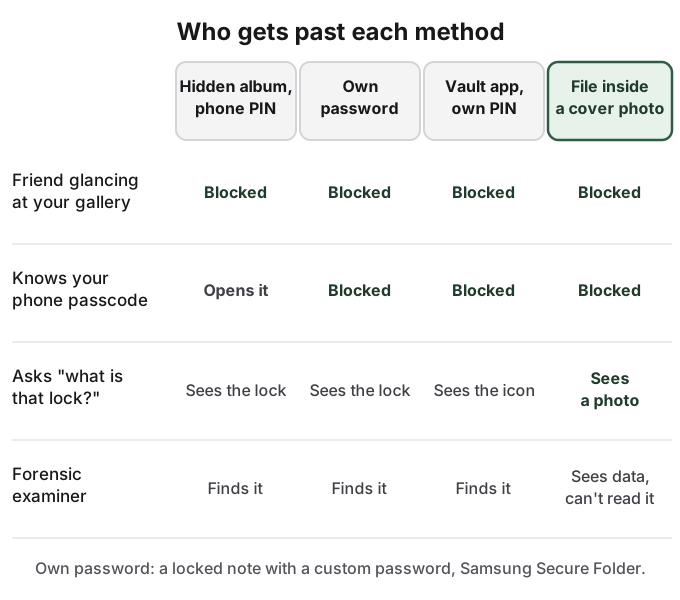
The visible lock is what gets noticed
Read the Reddit threads written by the person who found the hidden photos, and the discovery is almost never technical. In one r/relationship_advice post with 238 points, the poster saw a password-locked Google Photos space on a partner's phone, asked to see it, and was refused. She never opened it. The lock and the refusal were the whole story. Larger threads about a hidden folder found on a husband's phone run to hundreds of comments, and they start the same way: someone saw a hidden album, a locked folder or a vault app.
People who hide photos already sense this. In r/ios, one user asked for a "fake login / decoy vault, so even if someone unlocks my phone, there's nothing suspicious." A Reddit user in r/GooglePixel made the point about Android's Private Space: "I will not have a locked case in my pocket with the sign 'here are my private stuff'."
A lock protects what is inside. It also tells people there is an inside. That trade-off is fine when the person looking would accept "that is private" as an answer, and a problem when they would not.
How to hide photos secretly on iPhone and Android
The approach that holds up is layers, each one stopping someone the layer before does not.
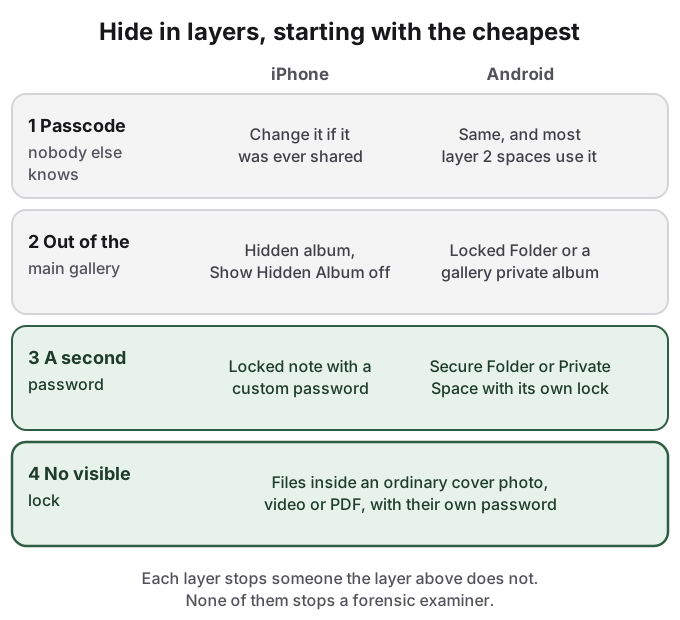
Layer one is a passcode nobody else knows. If a partner or parent has ever seen it, change it. This one step closes most built-in hiding spots to them.
Layer two takes the photos out of the main gallery. On iPhone, hide the photo (open it, tap the More button, tap Hide), then go to Settings > Apps > Photos and turn off Show Hidden Album, so the album is not even listed in Photos. On Android, Google Photos Locked Folder or your gallery app's private album does the same job. The details and every gap are in how to hide photos on iPhone and how to hide photos on Android.
Layer three adds a password the phone passcode does not open. On iPhone, that is a locked note with a custom Notes password, not the device passcode, which holds a handful of photos but not video. On Android, Samsung Secure Folder has its own lock, and Android's Private Space lets you "Choose new lock" instead of reusing the screen lock. Google's own help page notes that the "Private space: Tap to set up or open" result can appear in search even on a phone that has none set up, so its presence alone gives nothing away. See Samsung Secure Folder and Android Private Space.
Layer four removes the visible lock. Layers two and three each leave a sign that something is hidden: an album, a locked note, a folder icon. The only way to avoid that sign is to store the photos somewhere that looks like nothing, which is what the section below is about.
Copies leak out of hidden places
Hidden photos are often still somewhere else. With iCloud Photos on, a hidden photo is hidden on every device signed in to your Apple Account, and it is in the Hidden album on each of them, including a family iPad or an old Mac. Photos in an iCloud Shared Library are visible to every participant; hiding one moves it to their Hidden albums too. On Android, turning on Locked Folder backup copies the photos into your Google account, and Google warns that using a shared Google account inside Private Space exposes synced photos outside it.
Check also where the photo came from. A picture received in a messaging app often stays in that chat after you hide the copy in your gallery. The iPhone Hidden album guide walks through each of these on iPhone.
Hiding photos is legitimate; using them to hurt someone is not
Wanting part of your phone to yourself is ordinary, and for someone living with a controlling partner or parent it can be a matter of safety. Hiding photos to deceive someone in a way that harms them, or keeping images of another person without their consent, is a different thing, and no tool makes it acceptable. Our responsible use page sets out where we draw that line.
How HideFile can help
HideFile is built for layer four. It puts private photos, videos and documents inside an ordinary photo, video or PDF, called a cover file, encrypted in your browser with a password separate from your phone passcode. In Photos or Files, the cover is a normal picture. At hidefile.app, with the password, it shows your private files. There is no vault icon and no locked album to explain, and because the cover is a normal file, it moves to a new phone like any other. It runs in any browser; there is nothing to install. Files are not uploaded to a HideFile server.
It stops casual snooping, not forensic tools: a purpose-built tool can tell that data was added to a cover, though it cannot read the contents without the password. There is no password recovery. Messaging apps that re-save images can strip the hidden part, so send covers as files. While a cover is open on screen, anyone holding the phone sees it. For a border search, a trained examiner or legal pressure, it is the wrong tool.
Sources
- Apple Support: Hide photos with the Hidden album
- Apple Support: Lock your notes on iPhone
- Apple Support: Use iCloud Shared Photo Library on iPhone
- Google Photos Help: Hide photos with Locked Folder
- Android Help: Use private space
- Reddit, r/NoStupidQuestions: How can I hide pictures on my phone
- Reddit, r/ios: Is this app safe? Any experience with iLockBox
- Reddit, r/relationship_advice: I found a locked google photos app on my partner's phone
- Reddit, r/relationship_advice: thread about a hidden folder of photos found on a husband's phone
- Reddit, r/GooglePixel: "Hidden" Private space nonsense