
Hiding files without someone knowing means two things at once: the other person cannot open the files, and nothing on the device prompts them to ask. Most tools manage the first. The second is harder, because nearly every way of protecting a file leaves a sign that something is protected: a lock icon, a password prompt, a folder that was not there last week.
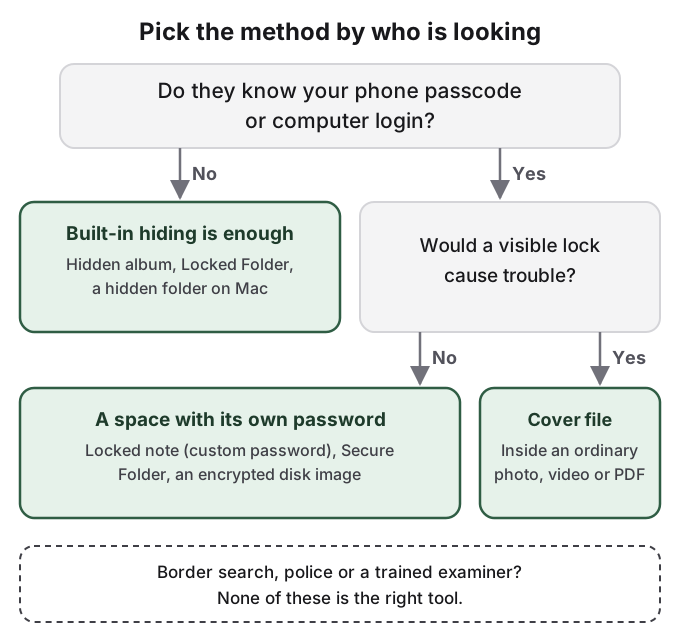
The other person is usually close. They share your computer, know your phone passcode, or manage your account. That changes which methods work. A password that is also your phone passcode keeps out nobody who knows it, and a visible lock invites the question you were trying to avoid.
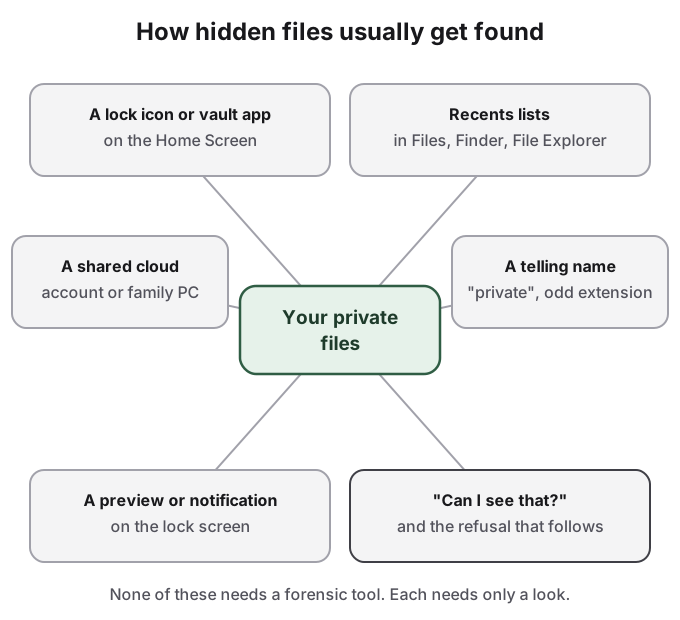
Hidden files are usually found by a look, not a tool
In the Reddit threads written by people who found something hidden on a partner's phone, the discovery is almost never forensic. In one r/relationship_advice post, the poster saw a password-locked Google Photos space, was refused when she asked about it, and never opened it. The refusal said enough.
The ordinary trail is short and visible. A vault app or locked folder on the Home Screen. A Recents list in the Files app, Finder or File Explorer that shows the last documents you opened. A cloud folder that syncs to the family computer because you share one account. A file called "private" or one with an extension nothing on the computer can open. A preview on the lock screen when a file arrives. And the moment someone asks "can I see that?" and the answer is no.
Hiding a file and locking a file are different jobs
Every platform offers two kinds of protection, and each does only half the work.
Hiding takes a file out of view. On a Mac, the hidden flag removes a file from Finder. On Windows, the Hidden attribute does the same in File Explorer. On iPhone, the Hidden album takes photos out of the library. There is no password, so anyone who turns on "show hidden items", or simply knows where to look, sees the file at once.
Locking puts a password in front of a file. An encrypted disk image on a Mac, a locked note on iPhone, Samsung Secure Folder or the Safe folder in Files by Google on Android all do this. The contents are protected, but the lock itself is in plain sight. A Safe folder or a .dmg file that asks for a password is exactly the kind of thing a curious partner or parent asks about.
The methods that do both, out of view and behind their own password, are few. That is why the choice depends on who is looking.
How to hide files without someone knowing, device by device
On iPhone, the built-in tools are built around photos. The Hidden album hides photos and videos and opens with your passcode; turn off Show Hidden Album in Settings > Apps > Photos so it is not even listed. A locked note with a custom Notes password is separate from the passcode, but it cannot hold videos, PDFs or other files. If the app holding your files is itself the giveaway, see how to hide apps on iPhone, and note that a hidden app's name still appears in Screen Time and battery usage, according to Apple's iOS 18 guide. Details for photos are in how to hide photos on iPhone.
On Android, the Safe folder in Files by Google puts files behind their own PIN or pattern and keeps it out of search. Google lists its limits plainly: forget the PIN and "you can't access your files", and copying Safe folder files from an old phone to a new one is on its list of things not to do, so plan to move them out before you switch. Samsung Secure Folder and Android Private Space also offer a separate lock. See hidden folders on Android and how to hide photos on Android.
On a Mac, the hidden flag takes a folder out of Finder in one command, and an encrypted disk image puts a password on a folder. How to hide files on Mac covers both, including the gaps: the hidden flag has no password, and a disk image shows plainly that something is locked.
On a shared Windows PC, the Hidden attribute keeps a file out of File Explorer until someone turns on hidden items, and a separate user account with its own password is the more reliable boundary. If you share one Windows account, assume anything in it can be found.
Two situations sit outside all of this. A teenager in an Apple Family Sharing group can hide an app, but Apple says a parent still "can see that the app was downloaded and how much time it's used". And on a work or school device managed by an IT department, monitoring software can see files before you protect them; keep personal files off it.
Privacy is legitimate; using it to harm someone is not
Wanting files of your own is normal, and for someone with a controlling partner or parent who checks their phone, it can be a matter of safety. Using hidden files to deceive someone in a way that hurts them, or to keep material about another person without their consent, is not something any tool should help with. Our responsible use page explains where we draw that line.
How HideFile can help
HideFile is built for the case where a visible lock is the problem. It puts private files, photos, videos and documents inside an ordinary photo, video or PDF, called a cover file, encrypted in your browser with a password separate from your phone passcode or computer login. Open the cover normally and you see the picture. Open it at hidefile.app with the password and you see your files. There is no vault app, no locked folder and no odd extension: the cover is a JPEG, MP4 or PDF and looks like one. It runs in any modern browser on iPhone, Android or a computer, with nothing to install, and files are not uploaded to a HideFile server.
The limits matter here more than anywhere. HideFile stops casual snooping, not forensic tools: a purpose-built tool can tell that data was added to a cover, though it cannot read the contents without the password. Your browser history shows you visited the site. There is no password recovery. Apps that re-save images can strip the hidden part, so move covers as files. And it is the wrong tool for a border search, a trained examiner or legal pressure.
Sources
- Apple Support: Lock or hide an app on iPhone
- Apple Support: Lock or hide an app on iPhone, iOS 18 edition
- Apple Support: Lock your notes on iPhone
- Files by Google Help: Safe folder in Files by Google
- Android Help: Use private space
- Reddit, r/relationship_advice: I found a locked google photos app on my partner's phone